
I am almost 99.9% sure that you would have implemented Google's +1 button on your blog website. What next? A million dollar question is how are you going to track the likes and dislikes of your web pages/blog articles done with Google's +1 button?
Get your Google +1 Button from here
A user comes to your blog, reads the article and presses +1 button. This will definitely add a count to it but how will you (as a website/blog owner) know about it? is there a way to track the button's activity?
Well, there is no direct way that Google has specified yet but i found a simple way of doing this with Google Analytics. Google Analytics exposes a functionality to track your own events. You don't need to dive deep into what events are and how they are tracked. I have done it for you.
The simplest thing you need to do is to add the following code to show Google +1 button on your site instead of what Google site provides. I have just added the code shown in BOLD to track it in analytics. If you have done customizations to the Google's +1 button code using advanced options, then you should add the code shown in BOLD below to your existing code else you can copy and paste it straightaway.
<!-- Place this tag in your head or just before your close body tag -->

<script type="text/javascript" src="http://apis.google.com/js/plusone.js"></script>


<!-- Place this tag where you want the +1 button to render -->

<g:plusone callback="GoogleLIKE_Analytics"> </g:plusone>


<!-- Function which records an entry in Google Analytics for an On (LIKE) or Off (DISLIKE) -->

<script type="text/javascript" >

function GoogleLIKE_Analytics(obj)

{

_gaq.push(['_trackEvent', 'GooglePlusOne', obj.state, window.location.href]);

}

</script>
How does the above code works?
The above code makes use of the custom functionality that can be added to Google +1 button when a user clicks on it. This is done using the parameter called callback. This stores the name of the function that will be called after user's click. We have added the function name GoogleLIKE_Analytics here. This function in turn creates a unique event with the name GooglePlusOne in your Google analytics and starts tracking the data. We are sending the value On if user liked it and Off if user took back his +1. The event tracker also tracks the link pf the web page which was liked and disliked so that you can know which articles/web pages are most liked by your readers.
Where can i see the tracking data in Google Analytics?
The tracking data will be available under Content->Event Tracking in your Google Analytics account.
Here is a snapshot of what it looks like for event GooglePlusOne:
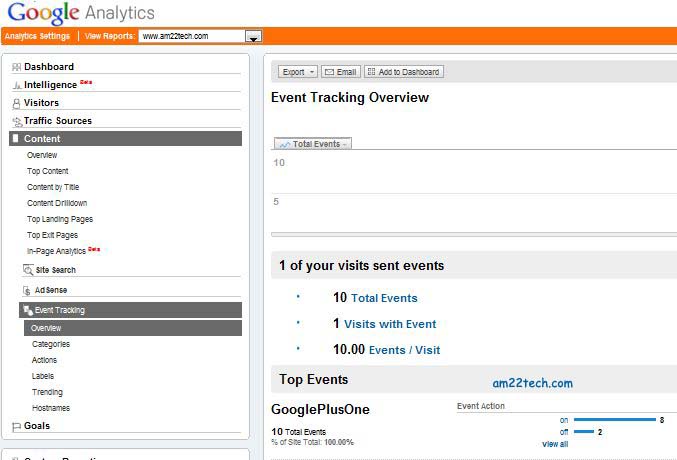
The action in our case is On for Like and Off for Dislike and you can track it using actions in left pane:
Click on labels in left pane to know the links from you website/blog which were liked (+1 pressed) and disliked:
Note: The above code will only work if you already implemented Google Analytics on your website.
Cheers !!!
f4eb2579-de0b-4c91-8d05-80e909b5e86e|0|.0