Calling Javascript from Visual Basic 6 Desktop Application
VB6_Calling Javascript.zip (2.50 kb)
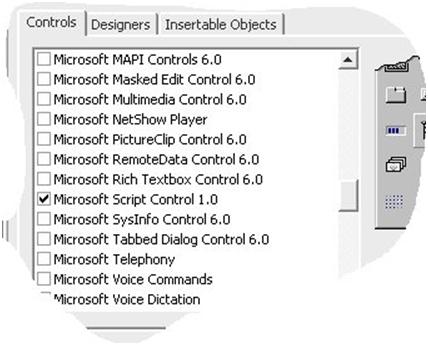
On a VB Form add a Script control Microsoft Script Control 1.0. It is in ProjectàComponents under Controls Tab as below:.
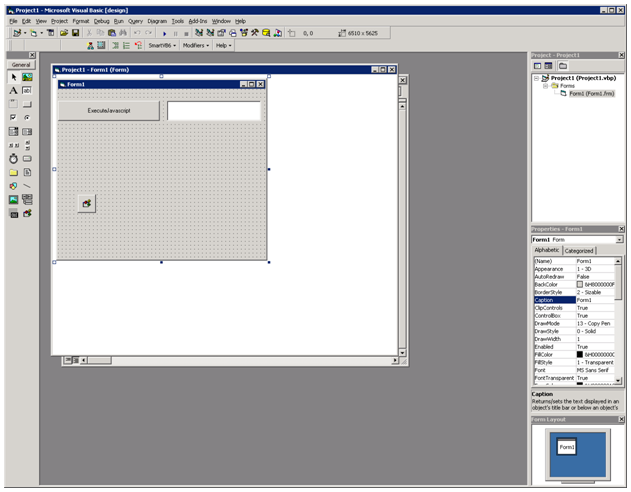
Add a Command button name - cmdExecuteJavascript ,
a Textbox name – Text1 and
Script Control name- ScriptControl1
Copy and Paste the below code to your project
VB 6 Code:
'Demonstration of Calling Javascript function by passing the parameter to 'javascript from VB6 'Desktop Application and getting back the result in VB 6
Private Sub Form_Load()
Dim strJavascript As String
Open App.Path & "\JavaScript.txt" For Binary As #1
strJavascript = String(LOF(1), 0)
Get #1, 1, strJavascript
Close #1
ScriptControl1.Language = "JavaScript"
ScriptControl1.Reset
ScriptControl1.Timeout = NoTimeout
ScriptControl1.AddObject "Any text you want", Me, True
ScriptControl1.AddCode strJavascript 'Load Javascript
End Sub
Private Sub cmdExecuteJavascript_Click()
'Calling Javascript function Greet() with parameter text1.text value
ScriptControl1.Run "Greet", Text1.Text
End Sub
Public Sub ShowResultinVBApplication(strResultfromJavascript As String)
' This sub is called by the Java script to pass the result on,
' in function Greet()
MsgBox strResultfromJavascript
End Sub
Java script Code:
function Greet(name)
{
var result;
result=Greeting(name);
//passing result to VB function, must be present in vb 6 form
ShowResultinVBApplication(result);
}
function Greeting(varName)
{
return "Hello "+varName+" !!!";
}
If you want to run the script in a WebBrowser then all you need to do is to add a WebBrowser control to your Form and a Command button.
The Javascript code as above remains unchanged but save it as a file and give it a file name like script_test.html
In the Command click event just do this
Code:
Private Sub Command1_Click()
WebBrowser1.Navigate App.Path & "\script_test.html"
End Sub
Only problem is when doing it this way you cannot get back the answer in your VB application unless you add some more code which I will show you if you are interested.
VB6_Calling Javascript.zip (2.50 kb)
84621beb-3d7c-4b5b-bfae-904067bac9cd|0|.0